
Best Time to Post on Instagram in 2026: The Complete Guide
If you’ve ever posted something on Instagram and felt like it disappeared into thin air, you’re not alone. Timing matters more than most people realize. The truth is, even the most creative content can underperform if it hits your audience’s feed at the wrong moment.
This guide covers everything you need to know about the best time to post on Instagram in 2026 — based on real data, updated platform behavior, and practical advice you can start using today. Whether you’re a creator, a small business, or just someone who wants more reach, this guide is for you.
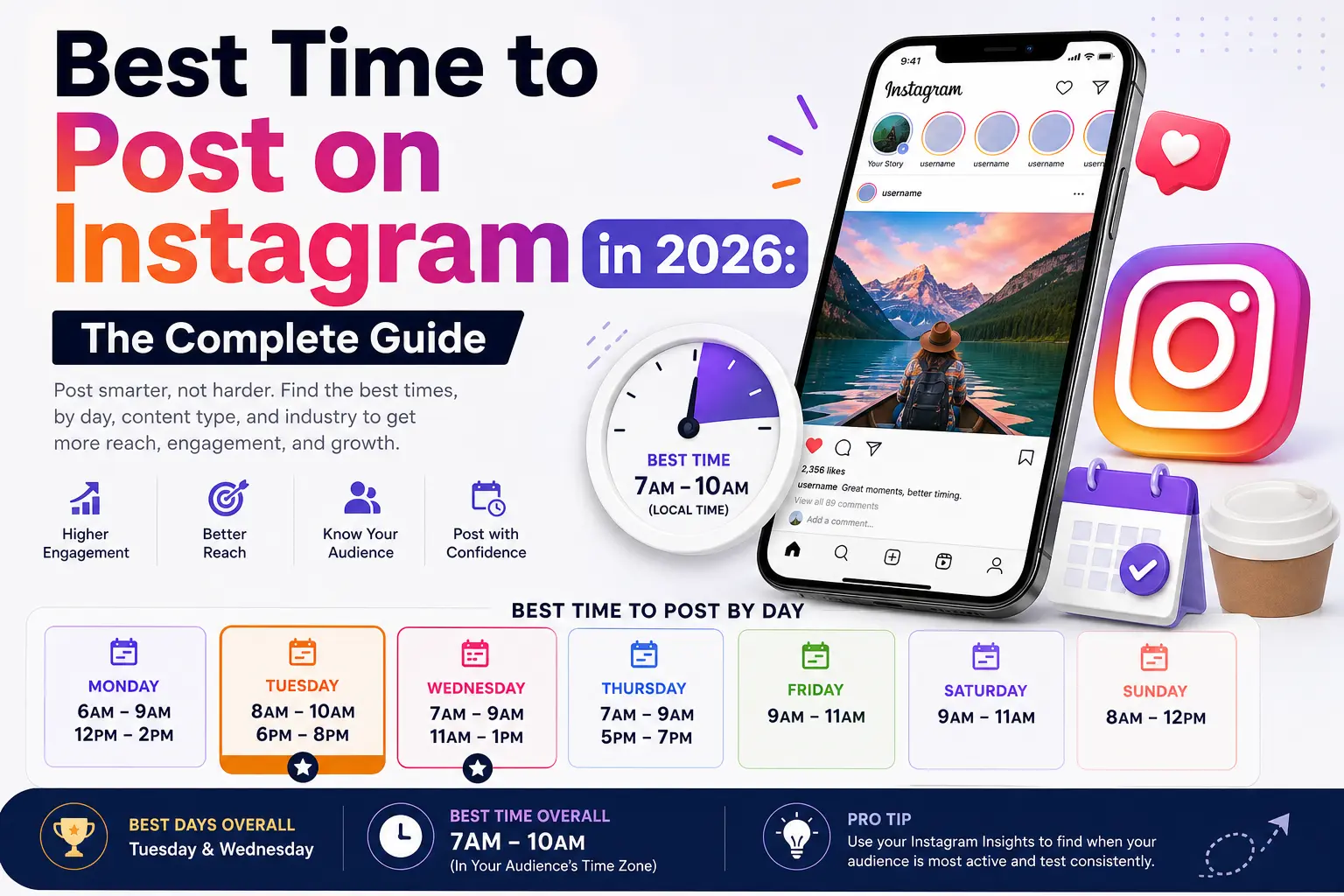
Best Times to Post on Instagram in 2026 (By Day)
Here’s a breakdown of the generally recommended posting windows based on aggregated engagement data across multiple industries and account types. These times are in local time zones (adjust for your audience’s location):
Monday: 6 AM – 9 AM and 12 PM – 2 PM. Early morning and lunch breaks tend to show strong engagement as people start their week.
Tuesday: 8 AM – 10 AM and 6 PM – 8 PM. Tuesday consistently ranks as one of the best days to post across almost every content category.
Wednesday: 7 AM – 9 AM and 11 AM – 1 PM. Midweek is when Instagram engagement typically peaks for the week.
Thursday: 7 AM – 9 AM and 5 PM – 7 PM. Similar to Wednesday, strong morning and evening windows.
Friday: 9 AM – 11 AM Engagement tends to drop on Friday afternoons as people transition to weekend mode.
Saturday: 9 AM – 11 AM People scroll more casually, but engagement can be lower for business or professional content.
Sunday: 8 AM – 12 PM Sunday morning is surprisingly active for lifestyle, food, and travel content.
Overall best days: Tuesday and Wednesday. Overall best time slot: 7 AM – 10 AM in your target audience’s time zone
These are starting points, not absolute rules. Your specific audience may behave differently.

Why Posting Time Actually Matters on Instagram
Instagram’s algorithm in 2026 continues to prioritize recency and engagement speed. When you post, Instagram shows your content to a small segment of your followers first. If those people engage quickly with likes, comments, saves, and shares, the algorithm pushes it to more people.
If your post goes live at 3 AM when your audience is asleep, that initial engagement window closes with little activity. The algorithm interprets low early engagement as a signal that the content isn’t worth showing to more people.
So the math is simple: right timing → faster early engagement → wider reach.
The Best Time to Post Differs by Content Type
Not all content has the same peak window. Here’s how different formats tend to perform:
Reels: Reels have broader discovery potential through the Explore page and Reels tab. They tend to perform well when posted between 9 AM and 12 PM, Tuesday through Friday. Because Reels are pushed algorithmically even to non-followers, they have more flexibility than feed posts.
Stories: Stories are consumed throughout the day, but posting between 7 AM and 10 AM means you’re in your audience’s queue right when they start their day. Evening stories (6 PM – 9 PM) also see strong views as people wind down.
Carousels: Carousel posts tend to get more saves and shares than single images. Morning posting (8 AM – 10 AM) works well, especially on weekdays when people save content to revisit later.
Static Image Posts: These are the most time-sensitive format. A static post that doesn’t get engagement in the first 30–60 minutes is likely to underperform. Stick to proven weekday morning windows.
Best Time to Post by Industry or Niche
Different audiences have different scrolling habits. Here’s a rough guide:
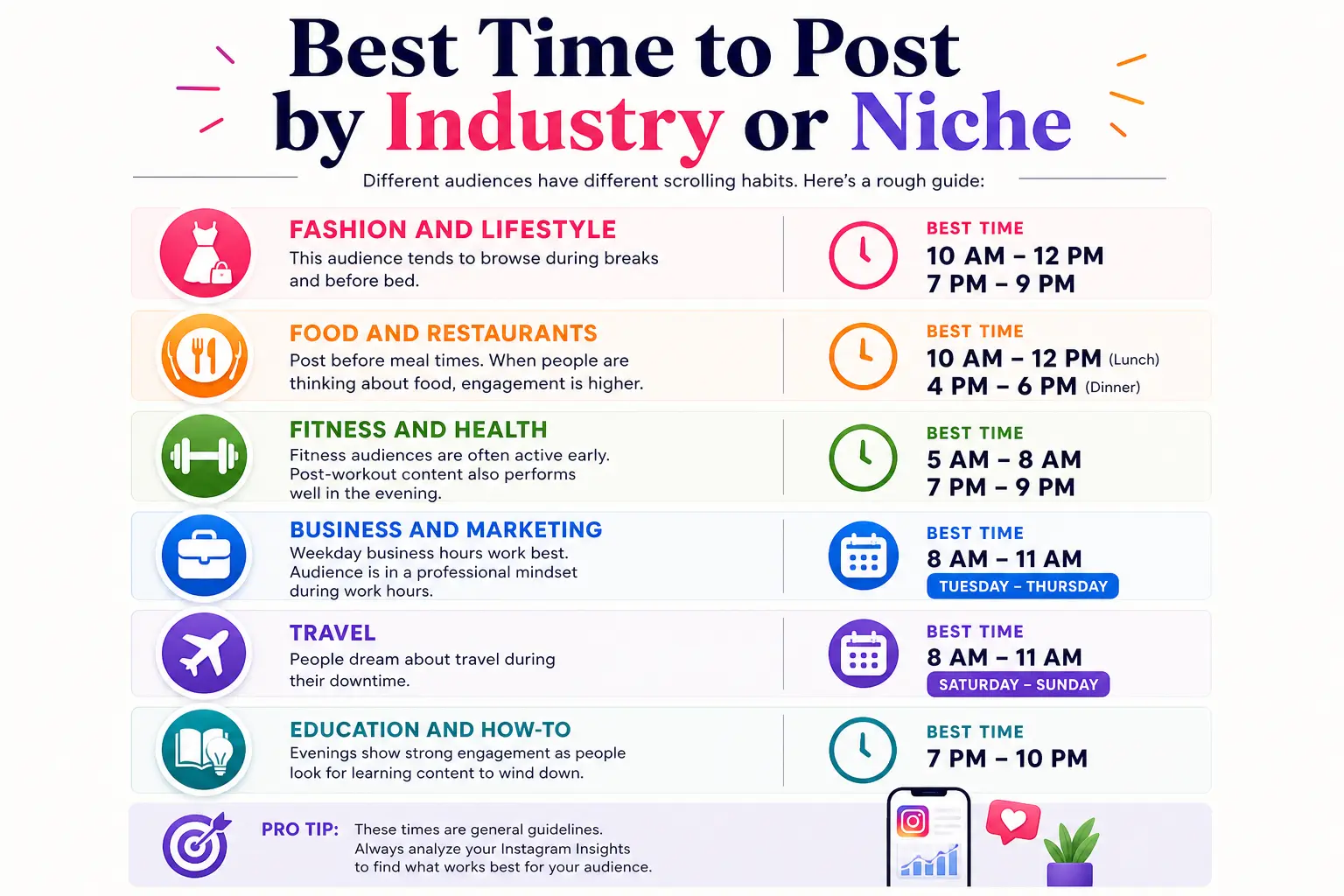
Fashion and Lifestyle: Late mornings (10 AM – 12 PM) and evenings (7 PM – 9 PM) work well. This audience tends to browse during breaks and before bed.
Food and Restaurants: Post before meal times, 10 AM – 12 PM for lunch content, 4 PM – 6 PM for dinner-related content. Posting when people are already thinking about food drives higher engagement.
Fitness and Health: Early mornings (5 AM – 8 AM) perform well, as fitness audiences are often active early. Post-workout content also sees good engagement around 7 PM – 9 PM.
Business and Marketing: Weekday business hours work best Tuesday through Thursday, 8 AM – 11 AM. This audience is often in a professional mindset during work hours.
Travel: Weekend mornings (Saturday and Sunday, 8 AM – 11 AM) perform well. People dream about travel during downtime.
Education and How-To: Evenings from 7 PM – 10 PM show strong engagement as people look for learning content to wind down.
How to Find Your Own Best Posting Time
Generic data is helpful as a starting point, but your actual best time depends on your specific audience. Here’s how to find it:
Step 1: Switch to a Professional Account. If you’re not already on a Creator or Business account, switch now. This unlocks Instagram Insights, which is where all your audience data lives. Go to Settings → Account → Switch to Professional Account.
Step 2: Check Your Audience’s Active Hours Open Instagram Insights → Your Audience → Most Active Times. This shows you a heatmap of when your specific followers are most active by day and hour. This is the single most important piece of data for your posting schedule.
Step 3: Analyze Your Post Performance History. Go to your recent posts in Insights and look at reach, impressions, and engagement rate by time. Look for patterns in which posts got the most early engagement. What time were they posted?
Step 4: Run a 4-Week Experiment. Pick three different time slots and rotate through them for a month. Track engagement rate (not just likes — look at saves, comments, and shares too). At the end of four weeks, you’ll have real data specific to your account.
Step 5: Adjust for Time Zones. If your audience is spread across multiple time zones, look at where your largest segment is located. Instagram Insights shows top audience locations. Post according to the majority’s local time.
What Instagram’s 2026 Algorithm Actually Prioritizes
Understanding the algorithm helps you make smarter decisions about timing and content together.
Instagram’s ranking system in 2026 evaluates content based on several signals:
Relationship signals: How often does a user interact with your account? Comments, DMs, tags, and story replies all signal a close relationship, which boosts your placement in that user’s feed.
Interest signals: What type of content does the user typically engage with? If someone always watches cooking Reels, Instagram shows them more cooking content.
Recency: Newer posts are preferred over older ones in the main feed. This is why posting time matters a post from two days ago competes poorly with fresh content.
Session behavior: If a user tends to open Instagram for quick 5-minute sessions, shorter, high-impact content (Reels, Stories) performs better. If they scroll for longer periods, carousels and detailed posts can shine.
Consistency signals: Accounts that post consistently are rewarded with more predictable reach. Erratic posting schedules make it harder for the algorithm to build an accurate model of your account’s performance.
Common Mistakes People Make with Instagram Timing
Even creators who understand the concept of posting times make avoidable errors. Here are the most common ones:
Posting at the same time every day without checking the data. Routines are good, but they should be based on your audience’s behavior, not just convenience.
Ignoring time zones. If your audience is primarily in the UK and you post at 9 AM Pakistan Standard Time, you’re posting at 5 AM in London before most people are awake.
Focusing only on likes. A post with 300 likes but 80 saves is outperforming a post with 500 likes and 10 saves in terms of algorithm signals. Track saves, shares, and comment quality.
Posting during Instagram outages or algorithm testing periods. Instagram occasionally rolls out algorithm changes that temporarily suppress reach. If engagement suddenly drops on a specific day, it may not be your timing. Check if others are experiencing the same.
Giving up after one bad post. A single underperforming post tells you very little. Patterns across 20–30 posts tell you a lot.
Does Posting Frequency Affect Reach?
Yes, but the relationship isn’t as simple as “more posts = more reach.”
Instagram itself has said that posting more than once per day can sometimes split your audience’s attention and dilute engagement across multiple posts. For most accounts, one to two posts per day is a healthy frequency.
Reels can be posted slightly more frequently because they’re distributed through the Reels tab, not just the main feed. Three to five Reels per week is a reasonable cadence for creators focused on growth.
Stories, on the other hand, can be posted multiple times daily without cannibalizing engagement. They exist in their own separate feed, and people expect frequent Story updates.
How HideViewer Can Support Your Instagram Strategy
When you’re building an Instagram strategy, understanding how your content is being viewed and by whom is part of the picture. Tools like HideViewer allow you to browse Instagram content anonymously, which is especially useful for competitive research and trend analysis without leaving a digital footprint.
For example, if you want to study how a competitor posts what times they publish, what content formats they use, and how their audience responds, you can do that privately using HideViewer without alerting their account that you’ve been viewing their profile or stories. This kind of quiet research is a legitimate and practical part of developing a smarter content strategy.
HideViewer is straightforward to use, doesn’t require you to log in to Instagram, and keeps your browsing private. It’s a useful tool to keep in your research toolkit when you’re analyzing content trends, studying competitor timing patterns, or just trying to understand what’s working in your niche without showing up in anyone’s viewer list.
Scheduling Tools Worth Knowing About in 2026
Manually posting at specific times every day isn’t sustainable. Scheduling tools help you plan content and publish it at optimal times automatically.
Meta Business Suite (Free): Instagram’s own native scheduling tool. You can schedule posts, Reels, and Stories directly. It also shows recommended posting times based on your audience data from Insights.
Later is one of the most popular third-party tools for Instagram scheduling. It includes a visual calendar, link-in-bio tool, and engagement analytics.
Buffer: Solid option for multi-platform scheduling. Good for teams managing content across Instagram, Facebook, LinkedIn, and Twitter simultaneously.
Hootsuite: Enterprise-level tool with deeper analytics and team collaboration features.
For most individual creators and small businesses, Meta Business Suite, combined with Later, covers everything needed without added cost.
April 2026 Update: What’s Changed Recently
Instagram made several notable changes in early 2026 that affect how timing and reach work:
Reels priority shift: Instagram has continued to give significant reach priority to Reels over static image posts, especially for accounts trying to grow beyond their existing follower base. If growth is your goal, Reels posted at optimal times outperform other formats.
Broadcast Channels integration: Instagram’s Broadcast Channels feature has matured. Creators who use Broadcast Channels to notify followers when they post see measurably better early engagement windows, which feeds the algorithm positively.
AI-powered feed curation: Instagram’s feed is now more personalized than ever, using AI. This means that content quality and relevance to your specific audience matter more than they did two years ago. Timing helps, but it works best alongside genuinely relevant content.
Stories ranking update: Instagram updated how Stories are ranked in early 2026, giving more weight to accounts that users have recently interacted with via DMs or profile visits. Building real relationships with followers now directly improves how prominently your Stories appear.
Quick Reference: Best Posting Times Summary
| Day | Best Times |
|---|---|
| Monday | 6–9 AM, 12–2 PM |
| Tuesday | 8–10 AM, 6–8 PM |
| Wednesday | 7–9 AM, 11 AM–1 PM |
| Thursday | 7–9 AM, 5–7 PM |
| Friday | 9–11 AM |
| Saturday | 9–11 AM |
| Sunday | 8 AM–12 PM |
Best days overall: Tuesday and Wednesday. Best time overall: 7–10 AM (local audience time)
Frequently Asked Questions
Does posting time matter more than content quality?
No. Content quality comes first, always. But great content posted at the wrong time will consistently underperform the same content posted at the right time. Think of timing as a multiplier for quality content, not a replacement for it.
Should I post at the same time every day?
Consistency helps the algorithm understand your posting pattern, but rigid consistency isn’t more important than posting at optimal times. If Tuesday at 8 AM performs significantly better for your account than Wednesday at 8 AM, prioritize performance over rigid routine.
What if my audience is international?
Focus on your largest audience segment’s time zone. Instagram Insights shows your top countries and cities. If your audience is genuinely split across regions, consider posting once for each major segment, or choose a time that overlaps reasonably between the two largest groups.
Do hashtags affect when I should post?
Hashtags affect discoverability, not timing. However, using relevant hashtags along with optimal timing creates a stronger combination; people searching those hashtags are more likely to find your freshly-posted content.
How long does a post stay “active” in the algorithm?
Most of a post’s organic reach is determined within the first 24–48 hours. After that, reach plateaus typically unless the post gets a sudden surge of engagement (like being shared widely or featured on the Explore page). This is why early engagement from posting at the right time is so valuable.
Is it better to post on weekdays or weekends?
For most niches, weekdays, especially Tuesday through Thursday, outperform weekends. However, lifestyle, travel, and entertainment content often perform well on Saturday and Sunday mornings. Use your own Insights data to confirm what works for your specific account.
Final Thoughts
The best time to post on Instagram is not a single universal answer; it’s a combination of general data, your audience’s specific behavior, the type of content you’re creating, and your niche. Start with the general recommendations in this guide, then refine based on your own Instagram Insights data over four to six weeks.
Consistency, quality content, and smart timing together create a compounding effect on reach and engagement. None of these elements alone is enough, but all three working together give you a real competitive advantage on the platform.
And when you’re researching what works in your niche, studying competitors, tracking trends, or analyzing content strategies, tools like HideViewer can help you do that research quietly and effectively, without disrupting your own account’s standing on the platform.
Start with the data. Test, observe, adjust. That’s the process that actually works in 2026.


